Skip to content
Operations software for movers

Never miss a lead, never drive back empty.

Pricing, quoting, job tracking, trip planning and collections in one panel. Customers submit requests on your site while you review the private price and corridor plan.

No card, no setup fee. You go live on your own subdomain.

Leg occupancy

Example corridor

İstanbul → Trabzon

  • İstanbul → Bolu%96
  • Bolu → Samsun%72
  • Samsun → Ordu%48
  • Ordu → Trabzon%31

A trip is not one block; every leg is counted separately. Filling an empty leg with partial freight earns a second revenue on the same fuel.

Hubi, the NakliyeHub mascot, waving hello

What you can rely on

We do not count numbers. We show the product.

You will not read “used by X companies” here — the product is new and a made-up counter helps nobody. Every claim below is backed by a screen that works in the panel.

  • K1/K2/K3 licence badge

    Enter your carrier licence in the panel and it appears as a badge on your storefront and quotes. Customers see it without having to ask.

  • Cookie-free customer pages

    Your storefront, price wizard, quotes and tracking pages write no cookies at all. No consent banner needed — and the pages load faster.

  • You are the data controller

    Under Turkish data protection law your company is the controller and we are the processor. Your data is isolated at database level; no other company can read a single row of it.

  • No-card trial

    Everything is open for 7 days. We do not ask for a credit card, and if you do not like it you need do nothing at all.

Product tour

Real screens, taken from the working panel.

These are not design mockups — they come from the running product. The only edit was cropping the test environment’s notice bar.

Price wizard

Let customers get the price from your site, not from you.

The visitor picks the service, the route and the goods, then instantly sees a range calculated from your own tariff. They pick up the phone only after they have decided.

  • Dual estimate where it applies: full truck and shared load side by side, with the better option marked.
  • The result is trip-aware: an upcoming trip on your corridor is shown with estimated pickup and delivery windows.
  • Every screen states plainly that this is an estimate, not a binding offer — no argument later.
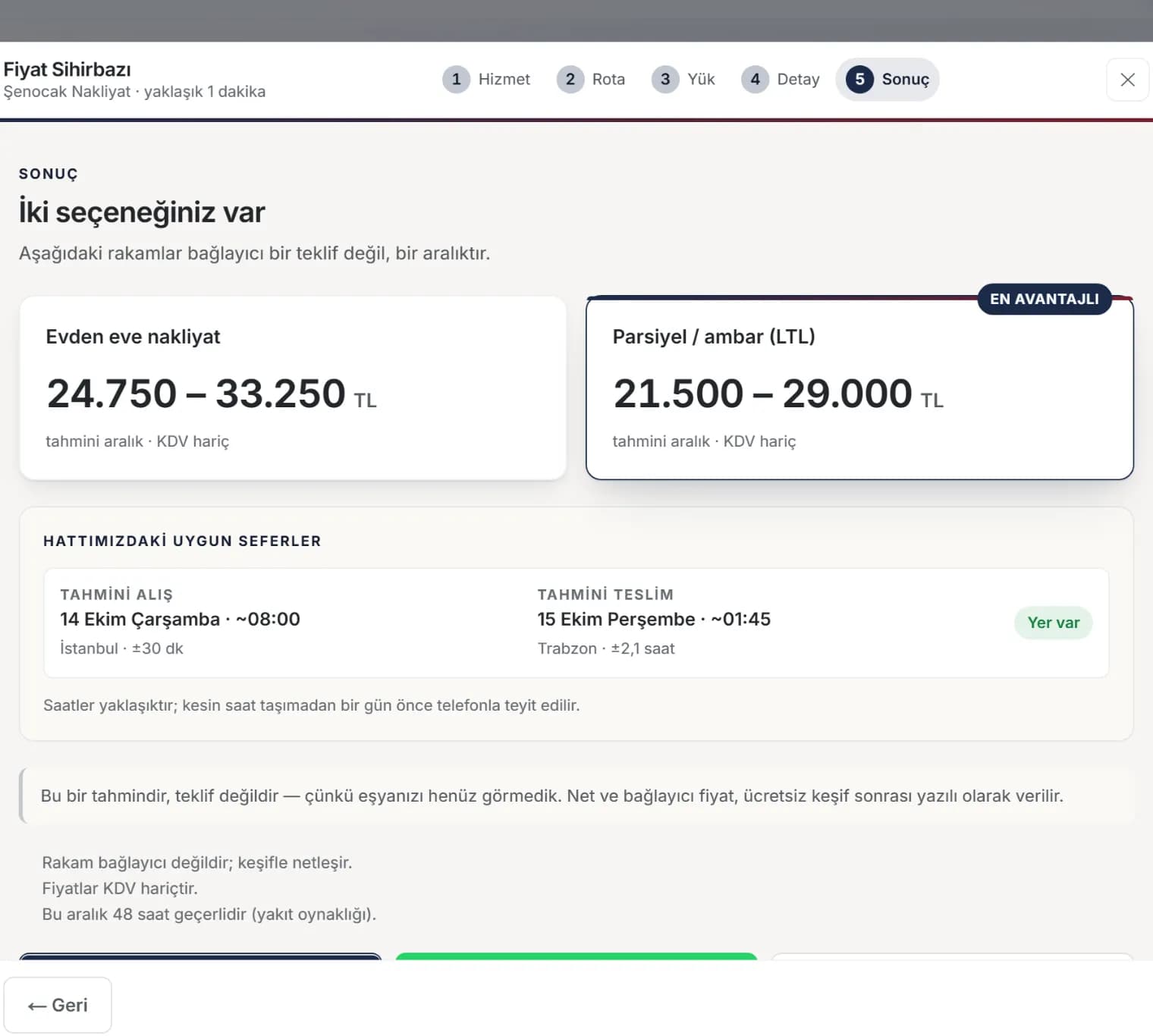
Request wizard result step showing a record number, request summary and expected response time

Trips and corridors

Split the trip into legs and see the space you have left.

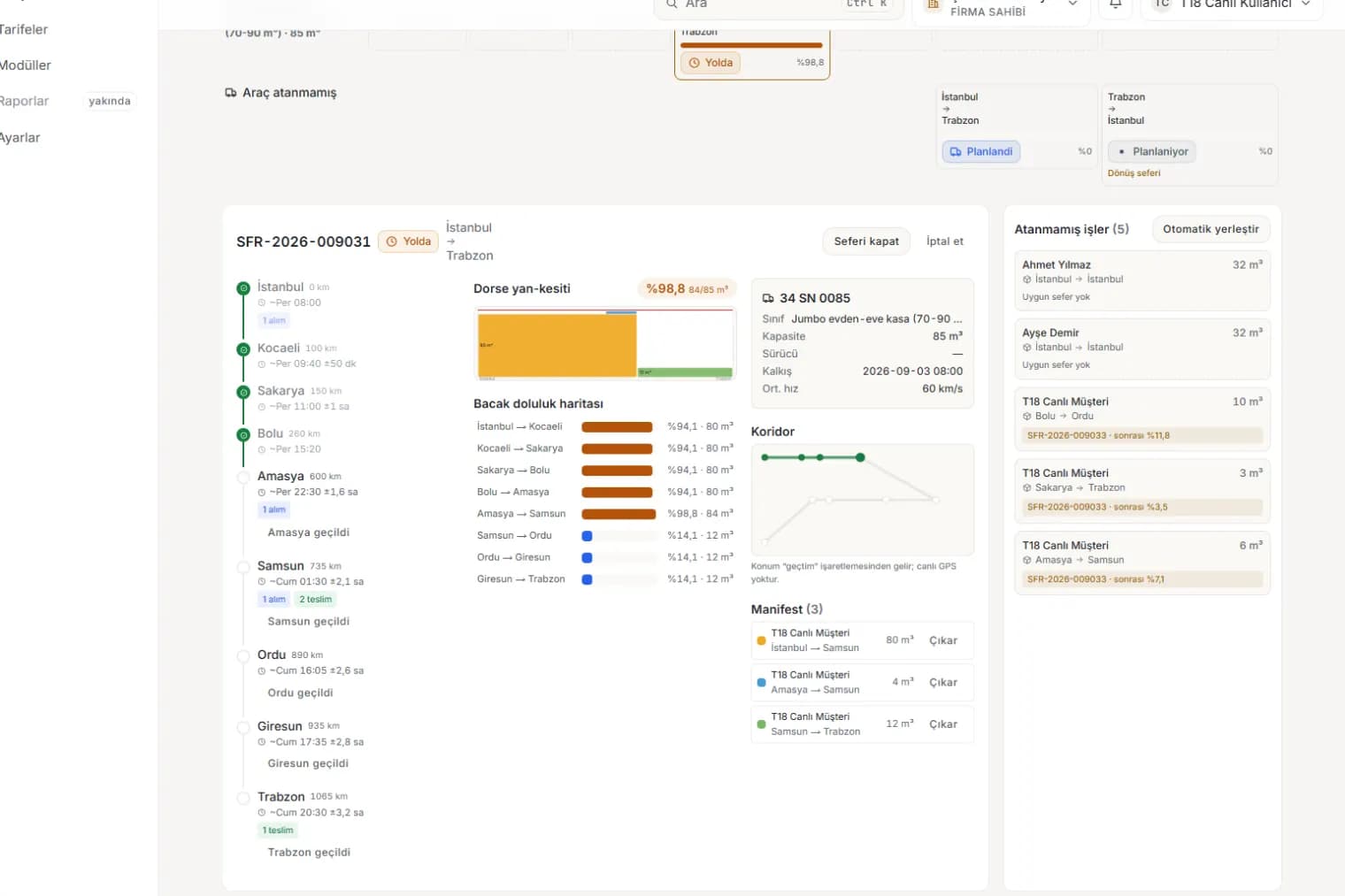
İstanbul–Trabzon is not a line but a sequence of legs that fill and empty. The panel counts occupancy per leg, so you can see where there is still room.

  • Intermediate stop ETAs account for driver rest rules and are always written as a window.
  • Over-capacity is flagged before loading; legs above 95% get a textured bar, not just a colour.
  • The return leg opens automatically as a planning trip — the empty backhaul does not slip your mind.
Trip detail: stop timeline, leg occupancy map and manifest

WhatsApp inbox

Keep the conversation in the panel and turn it into a lead.

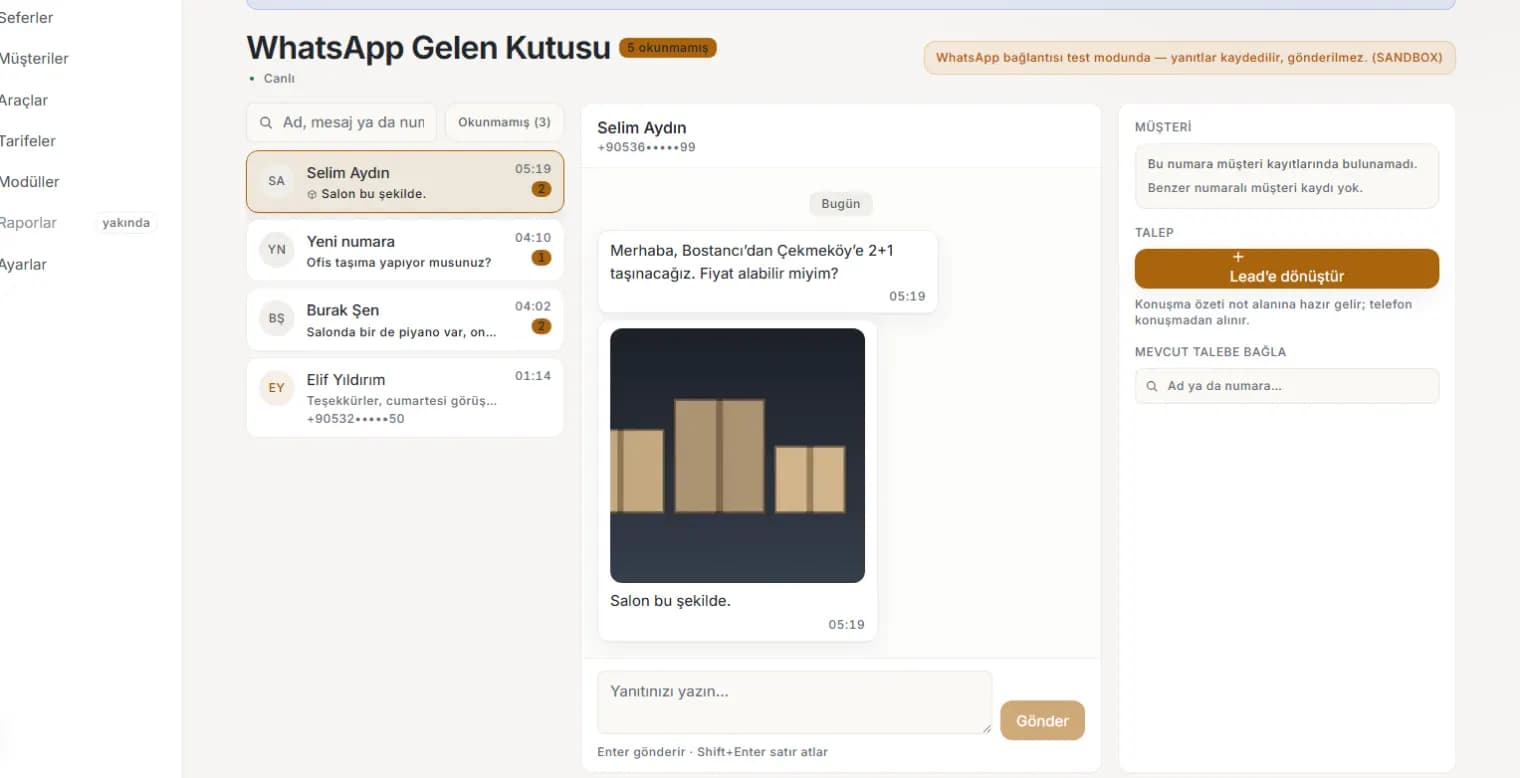
Incoming WhatsApp messages land in an inbox inside the panel. You reply, see the photos and create a lead with one click.

  • Unread counter and live updates — no need to keep checking your phone.
  • Create a lead from a conversation or attach it to an existing customer; the history merges into one card.
  • Quote links, trip and delivery notifications go out through the same channel.
WhatsApp inbox: conversation list, message thread and customer matching panel

Storefront and domain

Your own site, on your own domain.

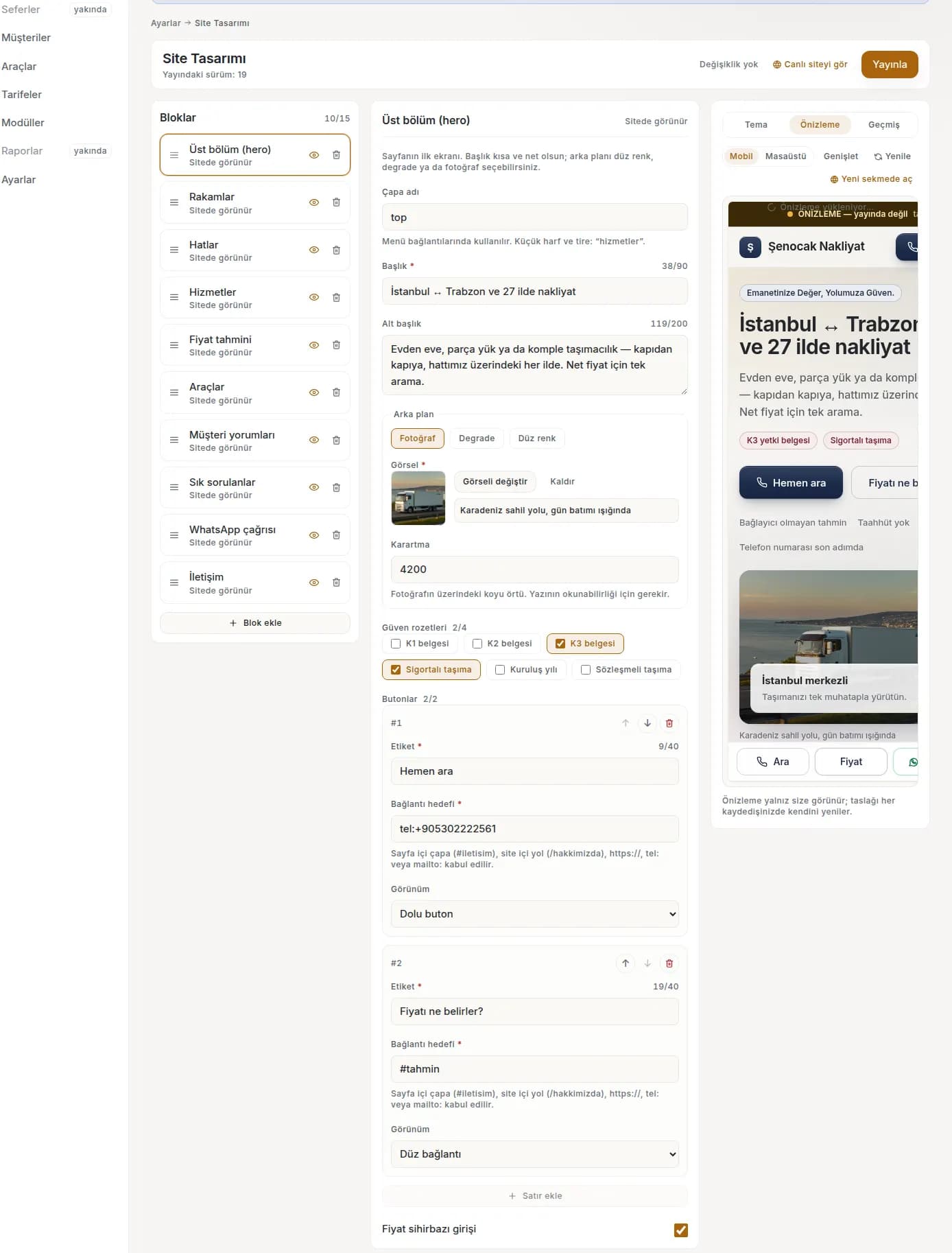
A storefront built block by block with a live preview beside it. When it is ready you publish, then connect your own domain.

  • Services, routes, fleet, FAQ and price wizard blocks come ready to use.
  • Colour and type presets — a look that matches your logo in a few clicks.
  • Publishing also generates the sitemap and the sharing image for search engines.
Site design screen: block list, field editor and live preview

The corridor difference

Most software counts a trip as one block. We count it leg by leg.

A trip does not carry the same load from start to finish: the space freed in Bolu travels empty all the way to Samsun. The panel makes that gap visible — this is the product’s signature.

Isometric corridor illustration showing a line that fills and empties across its stops

Occupancy per leg

Each stop-to-stop stretch is its own segment and occupancy is computed in m³ per segment. Colour never carries the meaning alone — texture and numbers do too.

Intermediate stop ETAs

Rest rules are taken into account, and marking “I have passed this city” recalculates the ETAs. Freight accepted en route enters the plan as well.

The return leg

On arrival a return trip opens automatically and is flagged with a low-occupancy indicator. An empty backhaul is not fate; it is a box to fill.

An ETA is always an approximate window; the panel never promises an exact time anywhere. The texts shown to customers say so explicitly.

Service types

Price whatever it is you carry.

20 service types ship ready; you switch them on and off in the panel. What you switch on appears in the wizard and on your storefront.

  • Full-service household move
  • Less-than-truckload
  • Full truckload
  • Single-item move
  • Student / studio move
  • B2B parcel / pallet
  • Hourly in-city van
  • Villa / large home move
  • Office relocation
  • US local move (hourly)
  • US long-distance move
  • Heavy & specialty items
  • Exterior lift service
  • Storage
  • Vehicle transport
  • Distribution route
  • Contract / recurring haulage
  • Event & exhibition logistics
  • Cold-chain LTL
  • International move

These types are configuration, not code: each maps onto one of five pricing engine families (tariff, full truck, hourly, project, recurring). Adding a type does not require a new software release.

Vehicle classes

The catalogue holds nine vehicle classes and your tariff works with a per-class kilometre factor. Below are the seven that are already illustrated, at true relative scale.

  • Cargo van
  • Light truck
  • Small truck
  • Medium truck
  • Large truck
  • Jumbo moving van
  • Semi-trailer

Add-ons

Not bundled — available when you want them.

There are two add-ons and both close a real gap. You request them from the panel and they switch on once approved.

  • TRY 490

    FidelisCall Voice Assistant & Chatbot

    Never miss a call: the voice assistant answers, walks the caller through the quote wizard and drops the request into your panel as a lead. Also embeds as a chat bubble on your site, with the transcript attached to the lead.

  • TRY 190

    Business Email

    Email on your own domain: [email protected], [email protected]. Five mailboxes, phone/Outlook setup details and a DNS wizard included. Quote emails reply straight back into this mailbox, so customers never see an unknown sender.

Add-on fees are separate from the plan fee and are billed in the same period.

Frequently asked

Your question is probably here.

What does NakliyeHub actually do?

It brings a moving company’s daily work into one place: it records incoming leads, produces a price from your tariff, prepares and sends the quote, tracks the job and the trip, keeps the proof of delivery, and writes collections and expenses into the ledger. It also publishes your customer-facing storefront.

What do I need to try it?

Just an e-mail address. Every module is open for 7 days; we do not ask for a card and nothing is charged automatically. When the trial ends the panel shows you the options.

Can my data mix with another company’s?

No. Each company’s data is isolated at database level (row-level security) and that isolation is verified by automated tests on every release. Even if the application layer had a bug, the database would not return another company’s row.

Can I connect my own domain?

Yes. You start on yourcompany.nakliyehub.com.tr; on Pro and above you can connect your own domain. The panel walks you through the DNS record and verifies it for you.

Is the WhatsApp integration official?

There are two options: pairing your own number by QR code, and Meta’s official Cloud API. We say plainly that the first carries a risk of number restrictions; the choice is yours. A wa.me link is always available as a fallback.

Can I leave whenever I want?

Yes. There is no commitment; if you do not renew at the end of a period the account closes. Before it does you can export your data — customer list, jobs, quotes and ledger entries included.

So that no trip comes back empty.

Signing up takes two minutes. Enter your company, pick your service types, add your first vehicle — and your storefront is live.

No setup fee. Write to us any time with questions.